


Transcribe Recordings
Import supported audio and video and review a timestamped transcript with speaker labels.

AI Transcription & Content Repurposing
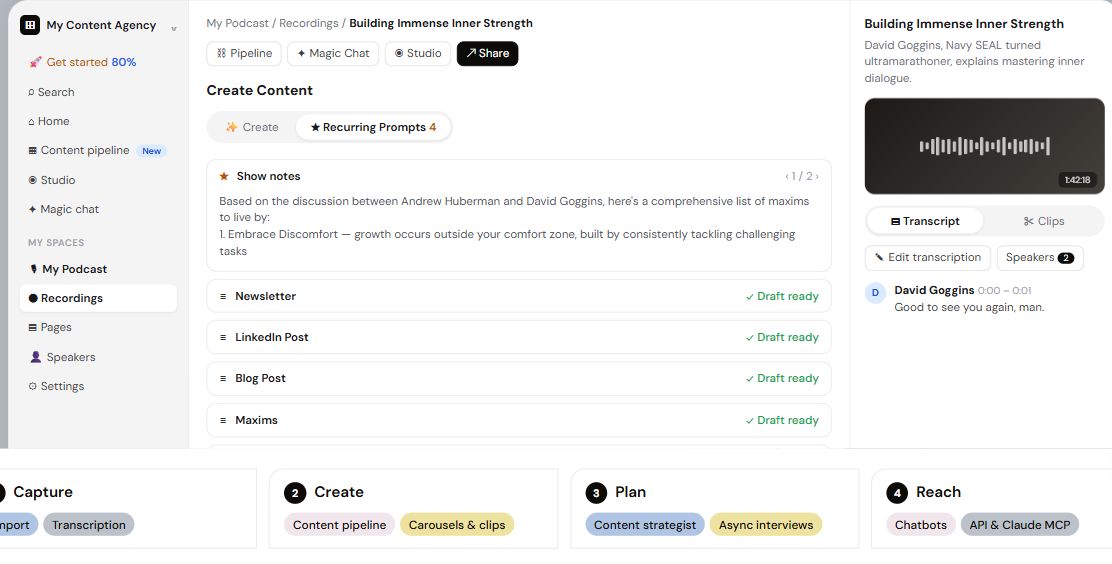
Castmagic turns recordings into editable transcripts and reusable content. Import a podcast, interview, webinar or meeting, then draft show notes, articles, newsletters and social posts from what was said. Its workspace also includes media clips, library-wide questions and tools for organizing recurring content workflows.
Creators, podcasters and content teams
Transcripts, show notes, articles, newsletters and media clips
Free trial advertised; Hobby $29/month with monthly billing
Web; iOS capture; supported integrations and API
Start with an audio or video file, a supported media link or a connected source. Castmagic produces a transcript with speaker labels and timestamps, which you can edit and export. Spaces keep recordings, pages and collaborators organized around a show, client or project.
Content presets and custom prompts transform the recording into different written formats. Recurring prompts run a chosen set on import; Magic Chat and the content strategist can work with recording context. Studio provides clips, captions, audiograms and carousels, while eligible integrations connect the library to other workflows.
Here are some of the most common ways people use Castmagic.
Import supported audio and video and review a timestamped transcript with speaker labels.
Create episode summaries, chapter ideas, highlights and descriptions from recorded discussions.
Develop a blog post or longer page from one or more recordings, then edit the draft.
Draft LinkedIn posts, threads, captions and short-form scripts in a chosen style.
Turn an episode or interview into an email edition with a focused topic and structure.
Use Studio for captioned clips, audiograms and styled image slides based on recorded material.
Use Magic Chat and the strategist to query recorded material and develop content ideas.
Apply recurring prompts on import and connect eligible feed, integration or API workflows.
Castmagic advertises a trial and paid subscriptions. With monthly billing selected, Hobby is $29/month, Starter $69/month and Team $199/month. Annual billing uses a separate upfront total and discounted monthly equivalent; Business and Scale require a larger or custom plan.
Transcription hours, storage, spaces and seats are separate limits. The current comparison labels hours as a library total, so do not assume they renew monthly. Additional hours or seats can cost extra; confirm API eligibility, trial allowance and the checkout terms for your plan.

MagickPen helps draft articles, reports, stories and marketing copy using a writing form with task, subject, language and style controls.
View Tool
WriteRush is a WordPress plugin for researching, drafting, editing, and publishing content.
View Tool
CopyGenius creates editable drafts for product descriptions, ads, blog content, emails and social posts from guided templates.
View ToolIt transcribes recordings and helps turn their content into written drafts, clips and other reusable assets within an organized media workspace.
Yes. Supported uploads, media links and RSS imports can bring existing episodes into the library. Source access, file size and transcription allowances still apply.
Yes. Edit the transcript and content drafts, adjust prompts and brand voice, or ask Magic Chat for a different version. Review the final meaning before sharing it.
Studio provides media clipping, caption styles, audiograms and related visual formats. It also supports image carousels; the available workflow depends on the media you import.
No. Paid plans have transcription-library limits alongside separate storage and seat allowances. Unlimited content regeneration or clipping does not mean unlimited transcription capacity.