


Brief a Campaign
Give Riley your goal, audience, offer, and channels to prepare work for review.

AI Marketing & Creative Workspace
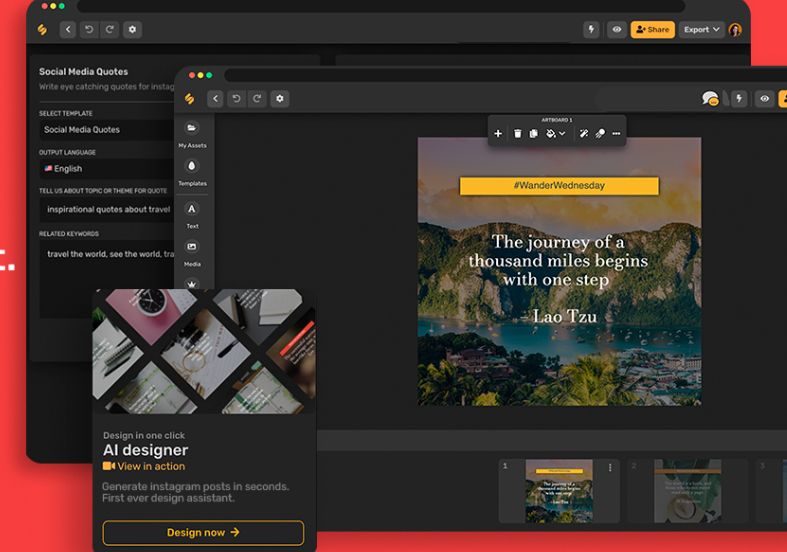
Simplified combines AI writing, design, video editing, and social publishing. Its Riley agent can turn a marketing brief into campaign assets for your team to review, while the individual creative tools remain available on their own.
Small businesses and marketing teams
Campaigns, social posts, copy, designs, video
Paid plans; trial available
Web; mobile apps and integrations
Simplified brings the main stages of marketing production into one platform. You can draft copy, create branded graphics, edit videos, and prepare social posts without moving each task into a separate workspace.
Riley adds a brief-driven workflow for recurring campaigns. Brand memory, connected channels, and approval steps help teams review the output before publishing. You can also use writing, design, video, and scheduling directly without asking an agent to run a campaign.
Here are some of the most common ways people use Simplified.
Give Riley your goal, audience, offer, and channels to prepare work for review.
Write blog drafts, captions, ads, emails, and product descriptions.
Start from templates or generate visuals, then adjust them in the design tools.
Trim and arrange footage, add subtitles, and prepare social video exports.
Use the clips tools to turn longer footage into shorter social content.
Prepare and schedule posts across your connected social accounts.
Keep logos, colors, fonts, and writing guidance available for projects.
Use approvals and collaboration tools to review content before it ships.
The main pricing page lists Starter at $79 per month with five campaign credits. A trial is advertised, and Pro and Business offer larger campaign allowances and more team seats.
One campaign credit covers one output type in a brief-to-approval cycle. Additional campaigns are listed at $10 each, and unused campaigns do not roll over. Check the selected plan and trial terms before subscribing.

PersonaBuilder generates buyer persona drafts and marketing ideas from your website or business description.
View Tool
Crevio helps build a website, sell digital products and manage business tasks through an AI-assisted workspace.
View Tool
MarketOwl is an AI marketer that turns business context into a strategy, approved work sprints, content and outreach across connected channels.
View ToolSimplified is a marketing workspace with AI writing, design, video tools, social publishing, and agent workflows.
A trial and some free tools are advertised. The main Starter subscription is listed at $79 per month; the full marketing workspace should not be treated as an unlimited free service.
Yes. The pricing page says design, video, writing, and social scheduling tools are available independently of agent campaigns.
One brief-to-approval cycle for one output type, such as a social batch, email sequence, or ad creative set.
It supports connected social scheduling and publishing, with approval workflows. The writing product also advertises WordPress and Shopify publishing integrations.