


Answer Customer Questions
Use configured business information to help answer questions about services, hours, prices and policies.

AI Customer Messaging and Business Assistant
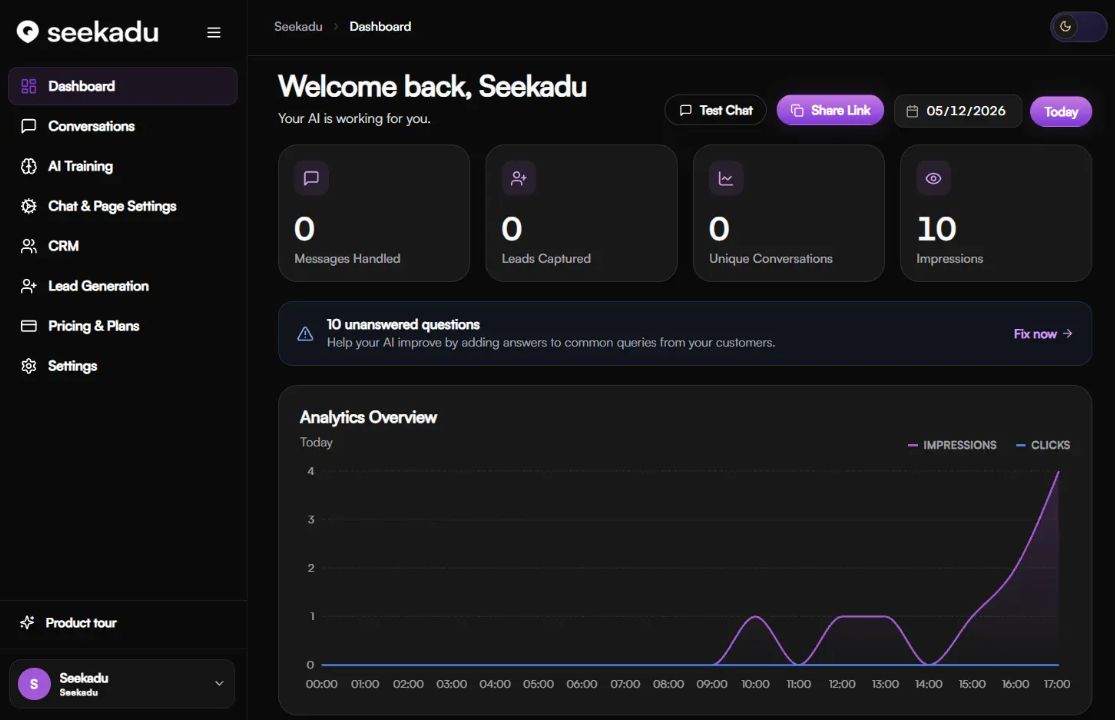
Seekadu is a customer communication platform for small businesses. It combines an AI assistant trained on business information with a shared inbox, conversation records, booking workflows and lead tools across supported messaging channels.
Small businesses handling customer enquiries
Customer questions, social messages, bookings and leads
14-day trial; Starter €99.99/month
Web; connected customer messaging channels
Seekadu brings business chat into one workspace. You provide your service details, prices, opening hours and policies, then connect the channels customers use to reach you. The assistant draws on this information when replying, while your team can review conversations and intervene when a case needs personal attention.
Its core channels include WhatsApp, Instagram, Facebook Messenger and website chat. A hosted Business Page and QR codes give customers additional entry points. CRM and booking tools connect conversations with follow-up work. Integration access, training capacity and advanced options depend on the plan and account configuration, so test the workflow your business actually needs.
Here are some of the most common ways people use Seekadu.
Use configured business information to help answer questions about services, hours, prices and policies.
Build a knowledge base from website content, supported documents and custom question-and-answer entries.
Bring supported social and website conversations into an inbox with history, assignments and internal notes.
Ask configured questions about interest, budget or timing and retain context for follow-up; confirm plan access.
Connect customer messages with contact records, intent details and conversation transcripts for your team.
Offer availability through supported calendar connections and send booking confirmations or reminders.
Give customers a hosted page with an embedded assistant, including a shareable link for your business.
Use QR codes on signs, cards or packaging to open a supported chat and route questions to the assistant.
A 14-day trial is advertised for Starter and Growth, with a credit card required and billing beginning after the trial unless cancelled. Monthly Starter costs €99.99 for 1,000 AI replies; Growth costs €179.99 for 2,000. Extra replies are €10 or €8 per 100 respectively. Enterprise pricing is negotiated.
The website advertises 20% off annual billing. The cancellation policy limits the 30-day refund offer to the first paid month of Starter and Growth; Enterprise has separate contract terms. Starter’s card and comparison table disagree about lead capture, so confirm that feature before choosing it.
Niche helps service businesses respond to inquiries, qualify leads, manage conversations, and book jobs through connected voice, text, email, and workflow tools.
View Tool
Website AI Support & Lead Capture
View Tool
Support AI helps you build a customer chatbot from your website and business material.
View ToolIt helps businesses manage customer conversations, answer routine questions, organize contacts and handle booking or lead workflows across supported channels.
The core pages list WhatsApp, Instagram, Facebook Messenger and website chat, with hosted Business Pages and QR entry points. Appropriate business accounts and channel permissions are required.
Yes. The setup guide describes website crawling, supported document uploads and custom Q&A. You can update missing information and review unanswered questions.
It can assist with routine messages, but your team still needs to check accuracy, handle exceptions and manage escalation. The terms do not guarantee correct answers or business outcomes.
Starter and Growth trials can be cancelled before billing starts. After standard paid cancellation, service runs until the current period ends. Enterprise follows its separate agreement.