


Manage a Shared Inbox
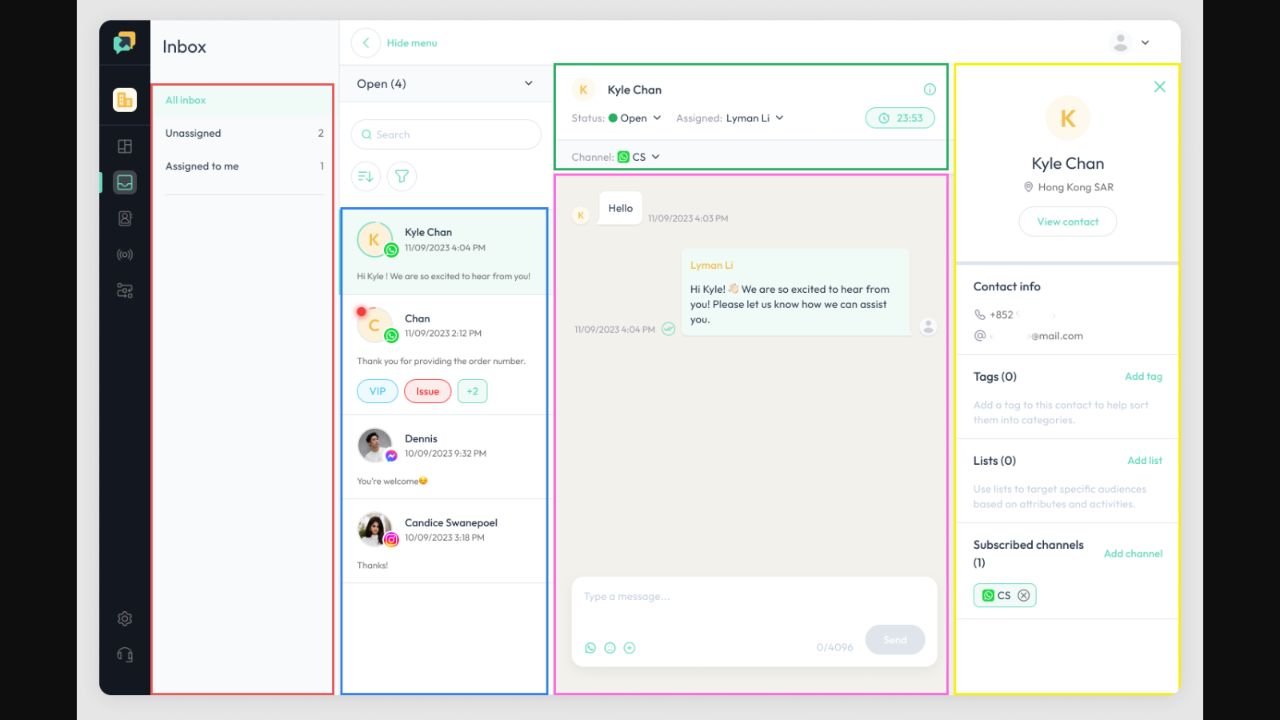
Read connected customer conversations, search messages and assign inquiries to a teammate. Filter the inbox by channel, tags or member.

AI Agents & Customer Messaging Workspace
ChatBooster brings customer conversations, contact records and automated workflows into one workspace. Build MindGen AI assistants, coordinate human replies and run targeted follow-ups across connected messaging channels.
Sales, support and social commerce teams
Customer messaging, AI replies, workflow automation, follow-ups
Free plan; paid Pro and custom Enterprise
Web; connected messaging channels
ChatBooster is a customer engagement platform for businesses handling sales and support through messaging. Its shared inbox combines connected conversations, while contact profiles and tags help staff understand who they are speaking to and organize the next action.
MindGen adds configurable AI specialists with their own knowledge bases, intent routing and a final response check. The visual automation builder handles defined customer journeys, while human staff can take over conversations that need judgment or personal attention.
Here are some of the most common ways people use ChatBooster.
Read connected customer conversations, search messages and assign inquiries to a teammate. Filter the inbox by channel, tags or member.
Connect triggers, conditions and messages in a visual editor. Add delays for follow-ups and test the journey before activating it.
Configure MindGen agents for different jobs, provide separate knowledge bases and route customer intent to the relevant specialists.
Generate suggested responses, adjust tone, translate messages and improve grammar while your team reviews what will be sent.
Bring interactions and profile information into a contact view. Add tags and create filtered lists for focused follow-up.
Choose an audience and messaging channel, personalize supported templates and schedule outreach to contacts who have opted in.
Use Coexistence Connect for an eligible WhatsApp Business number across phone and API workflows. Confirm setup requirements before connecting.
Inspect broadcast open, reply and click-through metrics. Use observed responses to adjust audience targeting and follow-up rules.
The Free plan lists 100 Monthly Active Contacts and one user, with no credit card required. Pro lists 3,000 active contacts and three users, with top-ups available. Enterprise is custom-priced. Threads and website Live Chat are listed on paid plans.
The official site contains conflicting Pro prices and some conflicting feature entitlements, so confirm the current billing period, rate and included modules in your account. Contact capacity, AI usage, additional channels and third-party messaging charges can affect the total; unlimited claims remain subject to fair use.

Niche helps service businesses respond to inquiries, qualify leads, manage conversations, and book jobs through connected voice, text, email, and workflow tools.
View Tool
Website AI Support & Lead Capture
View Tool
Support AI helps you build a customer chatbot from your website and business material.
View ToolIt is a customer messaging and automation workspace with a shared inbox, contact management, visual workflows and MindGen AI agents for sales and support.
A Free plan is available with 100 Monthly Active Contacts and one user. Paid plans add capacity and features. Verify the current feature matrix because some marketing descriptions differ from the detailed documentation.
A unique contact becomes active when your workspace sends or receives an interaction during a billing cycle, including a message, reply, broadcast or email. Repeated interactions with that same contact count once in that cycle.
The listed channels include WhatsApp, Facebook Messenger, Instagram, LINE, Threads and website Live Chat. Availability depends on your plan, account eligibility, permissions and the channel's own rules.
MindGen advertises alerts and human handover for complex conversations, and the inbox supports assignment to staff. Set up that routing and test realistic customer requests before relying on it in service.